Your Construction Procurement Log Has Outgrown the Spreadsheet


A construction procurement log keeps every item on track from first submittal to site. On a small job, a spreadsheet does the work. In a hospital, data center or high-rise, the log can hold thousands of items. Several engineers edit it at once. That's when the spreadsheet stops keeping up.
The problem isn't your team. The log was built to hold a list, not to tell you what's at risk.
Key takeaways
- A construction procurement log tracks every item against the date the schedule needs it on site.
- The best logs work backward from each Need-By date to show when a submittal must start.
- Spreadsheets fail on large projects because dates are re-typed, edits clash and risk shows up late.
What is a construction procurement log?
A construction procurement log is a shared record of every material and equipment item a project needs. It tracks each item from the first submittal through approval, ordering, fabrication and delivery. Its job is simple: make sure every item arrives before the schedule needs it installed.
The general contractor's project team owns it. On large projects, each project engineer runs their own trades, with an APM or PM over the whole log.
What should a construction procurement log include?
At a minimum, track the item, where it sits in the process and the dates that decide whether it arrives on time.
- Item and trade: what it is, the spec section and who installs it.
- Submittal status: where it is in review and who's holding it.
- Lead time: how long the manufacturer needs.
- Need-By date: when it must be on site.
- Approve-By date: the latest approval can land and still make the Need-By date.
- Start-By date: the latest the submittal can begin.
- Expected arrival: the current supplier ETA.
Most procurement log templates stop at the list. The three dates turn the list into a plan.
Why does a procurement log break down on large projects?
A spreadsheet can't keep up with thousands of items, several editors and dates that change every week. The result is a log that looks complete but can't be trusted when it matters.
- One file, many editors. Formulas get overwritten. Nobody knows who changed a date.
- Dates typed twice. Submittal dates live in Procore. Schedule dates live in P6. Someone re-types both.
- Risk shows up late. A status column won't tell you a submittal should have started last week.
- Reporting eats the week. Someone rebuilds the log into a summary before every meeting.
The cost adds up. In Veyor's beta with five enterprise general contractors, one team spent around 10 hours a week across four people keeping submittal tracking current. Another said manual tracking took a quarter of its team's capacity, rising to half at project start.
How do you calculate when a submittal needs to start?
Work backward from the Need-By date. Subtract the lead time and a buffer to get the Approve-By date. Then subtract the time needed for preparation and review to get the Start-By date. If today is past the Start-By date, the item is already at risk.
That's a quick sum for one item. For 2,000 items, updated every time the schedule moves, it's a full-time job.
What does a live construction procurement log look like?
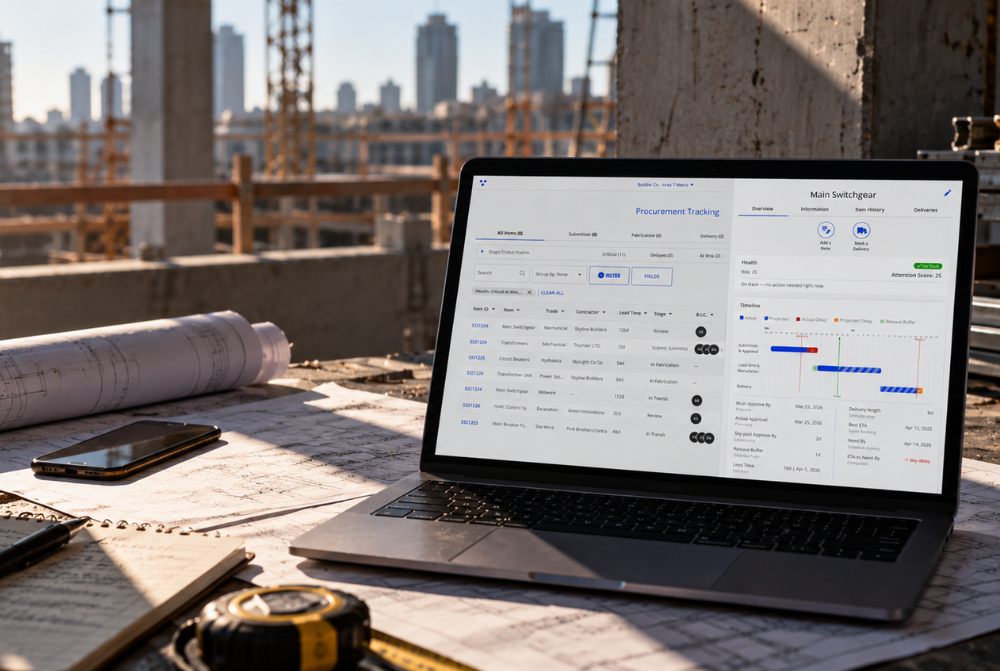
A live procurement log stays current without anyone re-typing it. It pulls in submittals, calculates the key dates and puts at-risk items at the top. That's how Veyor Procurement Tracking works.
- Coverage from the first submittal. Risk is visible while there's still time to act.
- Three dates, calculated for you. Start-By and Approve-By are set from every Need-By date and update when things change.
- What to act on, first. Items are flagged by risk, so the team starts with the short list.
- Built on Procore. Submittals come in automatically. Status and who's holding each item stay in step.
- Works with your P6 schedule. Import it and map activities to items for real Need-By dates.
- Not on Procore? Import your log from a spreadsheet or enter items directly.
Lead times are entered once per item. After that, there's no separate tracker to maintain. One beta team created 289 items from its Procore submittals in a single step at onboarding.
Construction procurement log FAQ
What's the difference between a procurement log and a submittal log?
A submittal log tracks documents through review. A procurement log follows the item through approval, ordering, fabrication and delivery, against the date the schedule needs it.
How often should a procurement log be updated?
At least weekly, and whenever a submittal, lead time or schedule date changes. A live log updates as changes happen.
Can I run a procurement log without Procore?
Yes. Veyor Procurement Tracking runs in full without Procore. Import from a spreadsheet or enter items directly.
See your procurement log in Veyor
Your team already knows what's on the log. Veyor shows them what to act on next.





Get the latest insights into your inbox