Procurement Tracking Software

Catch procurement delays before they hit the schedule

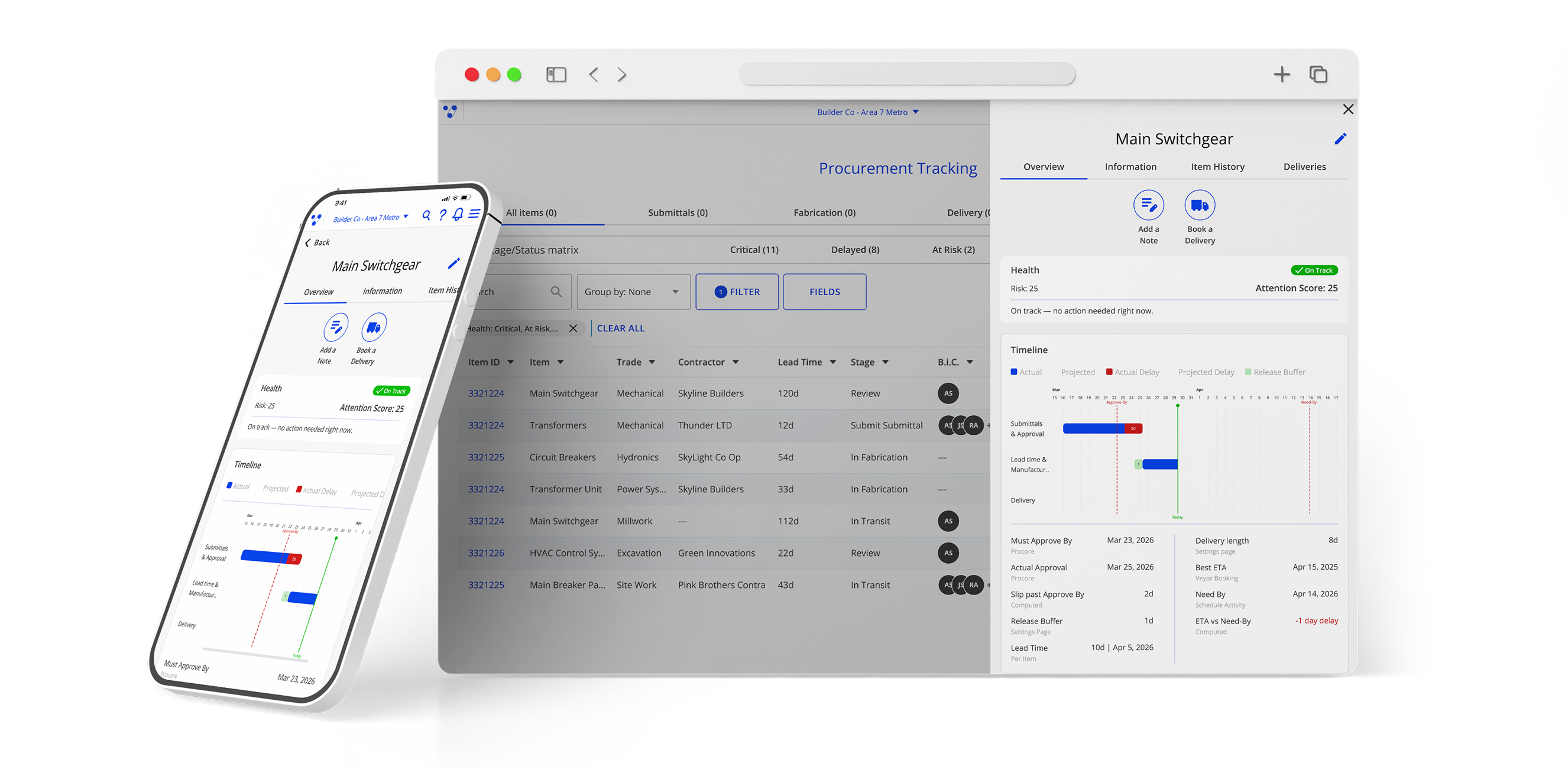
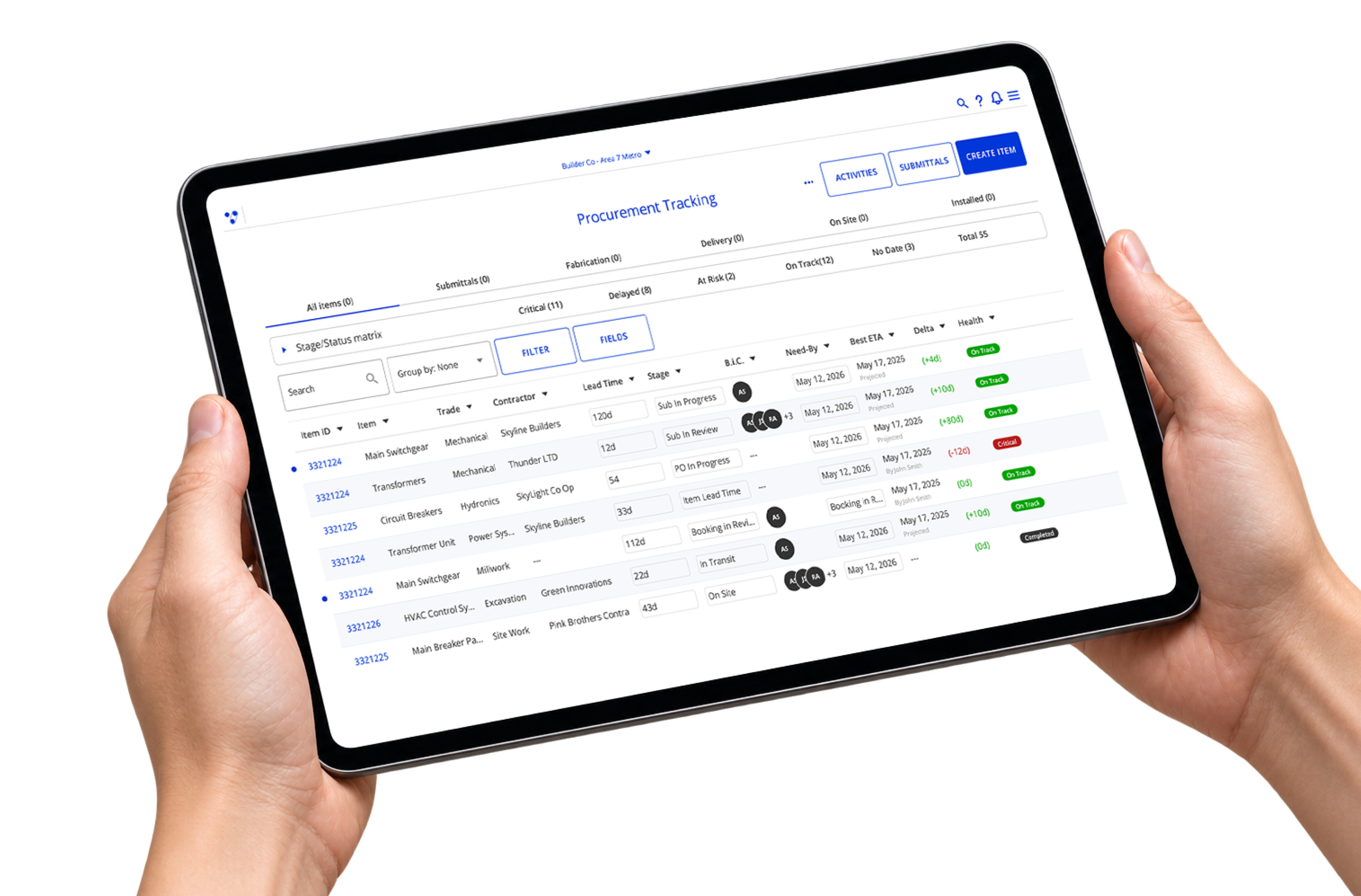
Bring submittal progress, project schedule dates and delivery activity into one prioritized view. See what’s on track, what needs attention and what happens next, from the first submittal through arrival on site.

Bring every procurement date into one clear plan

Every material has a date it needs to arrive on site. Keeping procurement on track means knowing when the submittal must start, when it needs approval and whether the current forecast still protects that date.

Veyor brings Procore submittal progress, P6 schedule dates, supplier lead times and delivery activity together. Teams get one clear view of what is on track, what needs attention and what happens next, from the first submittal through arrival on site.
‍

Three critical dates

Plan backward. See risk earlier.

Veyor works backward from when each material is needed on site, calculating the dates the submittal must hit to keep delivery on track.

Start By‍

When the submittal process needs to begin.
Approve By‍

The latest approval date that keeps delivery on track.
Need By‍

When the material must be on site.

Veyor compares these planned dates with current progress, giving teams an earlier view of risk and more time to act.

USE CASES

Know what’s at risk. Own what happens next.

Focus on what needs action now

Veyor flags and prioritizes delivery packages falling behind, so teams can focus on the items most likely to affect the schedule.
See which items need attention first
Understand how much buffer remains
Know who owns the next action

Keep procurement aligned with your schedule

Sync Procore submittals and import your P6 schedule by spreadsheet. See what needs attention in one procurement view, without replacing your existing tools.
Connect submittal progress to schedule dates
Reduce repeated data entry and reconciliation
Keep Procore as the submittal system of record

Follow every item through delivery

Track each delivery package from the first submittal through approval, lead time, transit and arrival on site.
Follow progress through the full procurement journey
Connect delivery information to schedule requirements
See changes before they affect the site

Walk into every review ready to act

Give project leaders a prioritized view of procurement risk without rebuilding the story before every meeting.
Share what is on track and what needs attention
See the owner and next action for each item
Use the item timeline to explain what changed

Track every item. Focus on what can delay the schedule.

Prioritized risk view

Veyor brings the items needing action to the top, helping teams focus on what matters now instead of reviewing every row in the log.

Three critical dates

Start By, Approve By and Need By connect submittal progress to when the material is required on site.

Track every delivery separately

Split one submittal into multiple delivery packages, each with its own Need By date, buffer and risk status.

Know what changed and when

Every status change and date shift is recorded on the item timeline, creating a clear history of procurement progress.

Make every next step accountable

See who owns each item, how long they have held it and where follow-up is needed.

Procurement through delivery

Connect submittal progress, supplier lead times and delivery activity through materials arriving on site.

Works alongside the tools your team already uses
Bring submittal progress, schedule requirements and delivery activity into one procurement view, while keeping the tools your team already uses.

Integrate with Procore to sync submittal status, workflow progress and ownership into Veyor.
Import P6 activities via spreadsheet and link schedule dates to the materials your project needs.

From project data to clear action

Coordinate deliveries, bookings, and access in one central construction management scheduling software. Tailored to your site, it gets your whole team working in sync. Track who's compliant, spot issues early, and improve operations.

‍

1

Bring the plan together

Sync Procore submittals, import your P6 schedule via spreadsheet
and add supplier lead times for each item.

2

Track materials as they will arrive

Structure each submittal into separate delivery packages, such as by level, area or shipment. Each package can have its own schedule requirement.

3

Calculate the critical dates

Veyor works backward from every Need By date to calculate when the submittal must be approved and when it needs to start.

4

Prioritize and act

Veyor compares the plan with current progress, surfaces the items falling behind and brings the most urgent actions to the top.

See how teams keep projects and facilities
moving with Veyor

frequently asked questions (FAQs)

From common questions to complex ones, straight answers to the questions that matter

How does Veyor help Procore users stay ahead of procurement delays?
Procore remains the system of record for your submittal workflow. Veyor puts that progress alongside your project schedule, supplier lead times and delivery activity, helping your team see where procurement needs attention. It calculates Start By, Approve By and Need By for each delivery package, then shows which items need attention. It works alongside Procore, not instead of it.
Does Veyor work if we already use a procurement spreadsheet?
Yes. We can import your existing procurement spreadsheet during onboarding. From there, Veyor connects the information from Procore and your project schedule while your team maintains item-specific inputs such as supplier lead times.
How does Veyor calculate procurement dates?
Veyor begins with the Need By date, based on when the material must be on site. It then works backward through delivery time, supplier lead time, purchasing buffers and the approval process to calculate Approve By and Start By.
How long does it take to connect?
Setup includes connecting Procore, importing the project schedule, selecting the submittals you want to track, structuring delivery packages and adding supplier lead times. The Veyor team supports the process during onboarding.
Does this replace our ERP or purchasing system?
No. Veyor does not manage purchase orders, invoices or financial data. It connects procurement dates, status, ownership, schedule risk and delivery progress in one operational view.
Does Veyor change our Procore workflow?
No. Your existing Procore workflow, submittal process and team access remain in place. Veyor uses the submittal information your team already maintains and connects it to schedule and delivery requirements.
How does Veyor help teams keep visibility across materials from order to delivery?
Veyor gives crews one place to track what’s ordered, what’s delivered, and what’s missing across suppliers and work fronts. With material tracking, teams reduce lost tickets, prevent bottlenecks, and keep inventory and QA records consistent from dirt to steel.
What makes Veyor a reliable construction material tracker for complex projects?
Veyor acts as a digital construction material tracker that connects planning, delivery, and materials approval in one workflow. Teams can coordinate engineered materials, verify loads on arrival, and maintain audit-ready records without spreadsheets or fragmented communication.

See what’s at risk before procurement delays hit your schedule.